













Skyhills Casino — Mobile App for iOS & Android
SkyHills Mobile Casino: Play Wherever You Are
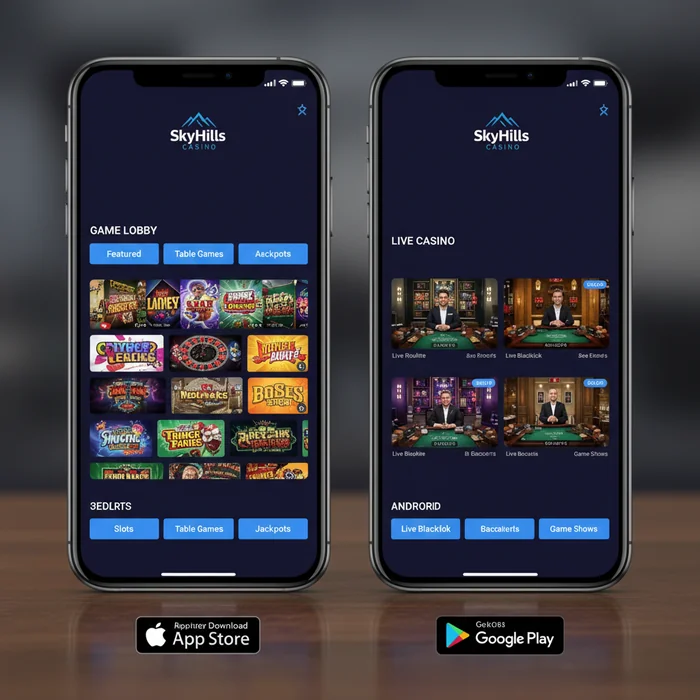
Did you know that the SkyHills app is built so that a new player can launch their first game within five minutes — without ever needing to sit down at a computer? That was exactly our goal when we designed the mobile experience. Whether you're on the train, relaxing on the couch at home, or taking a quick break, our platform goes wherever you go.
The SkyHills mobile casino environment gives you access to the full game library, account management, deposits, withdrawals, and customer support — all from your smartphone or tablet. We've tailored the interface specifically for beginners: large buttons, clear menus, and a clean layout ensure you'll never feel lost. Welcome to the game, on your terms.
Compatibility: Does the App Work on Your Device?
Behind the scenes, we've optimized the SkyHills download to support as many devices as possible. Whether you have a brand-new iPhone or an Android phone that's a few years old — chances are you can get started without any issues. Below you'll find an overview of the supported platforms.
| Platform | Minimum Version | Download | App Size |
|---|---|---|---|
| iOS (iPhone & iPad) | iOS 13.0 or later | Via the App Store | Approx. 85 MB |
| Android | Android 8.0 or later | Via APK file (direct) | Approx. 78 MB |
| Windows (desktop) | Windows 10 or later | No download needed — browser | Not applicable |
| Mobile browser | Any modern browser | No download required | Not applicable |
| Tablet (iOS & Android) | Same as iOS/Android | Via App Store or APK | Approx. 85–90 MB |
What Does the SkyHills App Offer?
Games on Mobile
Our mobile platform features over 1,200 games fully optimized for touchscreens. From classic slots to live table games — the selection is broad enough for beginners to explore at their own pace and find what suits them. Each category comes with a short description, so you know what to expect before you dive in.
Especially useful for new players: a large portion of our library is available in demo mode. You play with virtual credits, with no risk whatsoever. This is the ideal way to learn the rules, discover bonus features, and figure out your own preferences. Three titles that perform particularly well on mobile are Starburst Touch, Book of Dead, and the live game Lightning Roulette.
In addition to slots, we offer low-stakes table games where you can join in from small amounts. Our team has put together a series of beginner-friendly guides that you can access through the help menu — directly from within the app.
Mobile Bonuses
As a new player at SkyHills Casino, you have access through the app to the exact same welcome bonus as on the desktop version. We make no distinction: whatever you can claim on your laptop, you can also activate on your phone. Check out our full bonus overview on the bonuses page.
We also regularly send app-exclusive promotions via push notifications. Think limited-time free spins on new titles or cashback offers available only through mobile. As a beginner, it's well worth enabling push notifications — so you never miss an opportunity.
All bonus terms and conditions are clearly described within the app itself. Tap on an offer and you'll instantly see the wagering requirements, the validity period, and which games count toward it. We believe it's important that you know exactly where you stand, especially when you're working with bonuses for the first time.
Banking on Mobile
Depositing and withdrawing via the SkyHills mobile app is just as smooth as on the desktop version. In the cashier section, you'll find an overview of all available payment methods, including Visa, Mastercard, iDEAL, Skrill, Neteller, and various cryptocurrencies. Deposits are typically processed within seconds.
Withdrawals are handled once your identity verification is complete — a one-time process that we've made as straightforward as possible. Upload your documents directly through the app using your phone's camera. After that, you'll never need to do it again.
We designed the payments page with beginners in mind: step-by-step instructions guide you through your first deposit. Still have a question? Live chat is accessible via a fixed button at the bottom of the screen — always visible, always quick.
Downloading the SkyHills App: Step by Step
iOS Download
- Open the App Store on your iPhone or iPad and search for "SkyHills Casino".
- Tap the "Get" button or the cloud icon next to the app to start the download.
- Wait for the installation to complete — this typically takes less than a minute on a normal Wi-Fi connection.
- Open the app, tap create an account, and follow the three registration steps to get started right away.
Android Download
- Visit our app page through your Android browser and tap the "Download APK" button.
- If your phone prompts you, allow apps from unknown sources to be installed — this is a standard Android setting and completely safe for official APK files.
- Open the downloaded file from your notification bar or file manager and tap "Install".
- Once installed, open the app and you can immediately register or log in via your dashboard.
Don't want to download anything? No problem. Simply visit skyhilllscasino.com through your phone's browser — Chrome, Safari, or Firefox all work perfectly. You'll play directly in the browser without installing a single file. The full game library, all bonuses, and live chat are fully available. Perfect if you want to try out the platform before committing.
Mobile vs. Desktop: Which One Suits You?
Both versions of our platform are fully functional, but each has its own strengths. The comparison below will help you determine which option best fits your playing style — especially if you're just getting started.
| Feature | Mobile App | Desktop |
|---|---|---|
| Game selection | 1,200+ optimized titles | Full library, including all variants |
| Graphics quality | Optimized for touchscreen | Maximum resolution on a large screen |
| Loading speed | Fast on good 4G/5G or Wi-Fi | Consistently fast via wired connection |
| Push notifications | Yes — exclusive offers delivered instantly | Not available |
| Bonuses | All bonuses + app-exclusive promotions | All standard bonuses |
| Payment methods | Fully identical to desktop | Full range available |
| Live chat | Always visible via fixed button | Available through the help menu |
In short: use the mobile app when you're on the go or want to jump into a quick session without sitting down at a computer. The desktop version is ideal when you're planning a longer session and want to make the most of a large screen — for example, with live table games featuring multiple camera angles. For beginners, we recommend starting with the app, as the interface is easier to navigate on a touchscreen.
Performance and Technical Details
Speed, Data Usage, and Battery
The SkyHills mobile app is optimized to use as little data as possible without compromising on visual quality. Slots consume relatively little data per session on average; live casino games require slightly more bandwidth due to the video stream. Everything runs smoothly on a 4G connection; 5G naturally delivers the most seamless experience.
As for battery consumption: we've built the app to keep background processes to a minimum. Once you close the app, all activity stops immediately. For longer sessions, we recommend keeping your phone plugged in — not because the app is demanding, but simply because any active screen uses power.
Offline play is not possible for real-money games, as a live connection is required for fair gameplay and account security. However, demo versions of some games can be cached for a faster restart during your next session.
Our recommendation for the best performance: Play over Wi-Fi or a stable 4G/5G connection, enable push notifications so you never miss a promotion, and make sure your app is up to date via the App Store or by downloading a fresh APK. Updates don't just bring new games — they also include performance improvements that noticeably reduce loading times.
Start Playing on SkyHills Mobile Today
Whether you choose the downloadable app or play directly through your mobile browser — SkyHills has designed the mobile experience so that even a complete beginner feels right at home from the very start. Demo games, straightforward bonus explanations, low-stakes tables, and always-available live chat: everything is in place to make your start as smooth as possible.
Ready to begin? Create an account in three easy steps via our registration page and discover for yourself why more and more players are choosing Casino SkyHills as their go-to mobile gaming destination. The adventure starts with a single tap — and that tap belongs on SkyHills.
Frequently Asked Questions
How do I download the SkyHills Casino app on my phone?
The SkyHills Casino app is available through the official website skyhilllscasino.com, where you can find the download link for both iOS and Android. Android users will need to enable installation from sources outside the Google Play Store in their device settings before installing the APK file. The entire download process typically takes no more than 2 to 3 minutes, depending on your internet connection.
Is the SkyHills Casino app available for both iPhone and Android?
Yes, the SkyHills Casino app is fully compatible with both iOS and Android devices. iPhone users will need iOS 12.0 or higher, while Android users require at least Android 6.0 to run the app smoothly. Both versions offer the same full range of features, including access to all games, deposits, and customer support.
What casino games can I play on the SkyHills mobile app?
The SkyHills Casino app gives you access to hundreds of games, including slots, live casino games, roulette, blackjack, and video poker. The app is optimized for mobile play, ensuring all games run smoothly on both smartphones and tablets without any loss of quality. Live casino games are streamed in high definition, delivering an authentic casino experience directly on your screen.
Why can't I install the SkyHills app on my Android phone?
Since the SkyHills Casino app is not available through the Google Play Store, you will need to enable "Allow installation from unknown sources" on your Android device by going to Settings, then Security or Privacy. Only download the APK file from the official website skyhilllscasino.com to ensure the safety of your device. If the installation still fails, check that your Android version is 6.0 or higher and that you have enough storage space available — at least 100 MB free.
Does the SkyHills app offer separate bonuses for mobile players?
SkyHills Casino regularly offers exclusive promotions specifically targeted at players using the mobile app. These offers are displayed directly within the app under the "Promotions" tab once you are logged into your account. It is recommended to enable push notifications so you are the first to know about limited-time mobile bonuses and free spins available through the app.